
Laptop Overheating Repair in Ahmedabad
A laptop that runs hot slows itself down on purpose to survive, and every hot hour shortens the life of the board and the battery. In Ahmedabad this is the most common service we do.
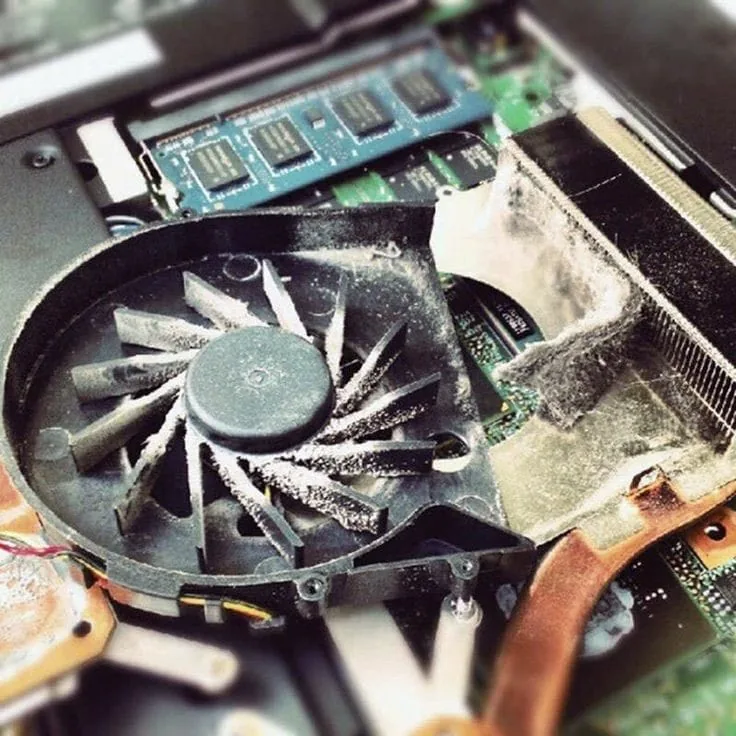
Why laptops overheat
Dust is the main cause. The fan pulls air across a fine radiator, and over a year or two that radiator packs solid with dust and hair. The fan keeps spinning, the noise goes up, but almost no air is getting through.
The other half is thermal paste. The paste between the processor and the heatsink dries out over several years and stops conducting heat properly. Both problems build slowly, which is why people put up with a hot, loud laptop for a long time before doing something about it.
The heat matters beyond the noise. When the processor gets too hot it throttles, deliberately running slower to protect itself, which is why an overheating laptop feels sluggish. Sustained heat also ages the battery and stresses the solder joints on the board.
Symptoms we see
- The fan is loud constantly, even on light tasks
- The base or the keyboard is uncomfortably hot to touch
- Shuts down on its own, usually during heavier work
- Slows to a crawl after twenty minutes of use
- Games or video calls stutter after a few minutes
- Very little air, or hot air, coming from the vents
We open the laptop and remove the heatsink assembly properly rather than blowing compressed air into the vents from outside, which mostly pushes the dust deeper into the radiator.
The radiator and fan are cleaned out, the fan bearing is checked for wear and the old thermal paste is removed from both the processor and the heatsink before fresh paste is applied at the right coverage.
Then we run the laptop under sustained load and watch the temperatures to confirm they hold where they should. If they do not, there is a further fault, and we find that rather than handing back a laptop that will overheat again next month.
How a repair works here
The same five steps every time, so you always know where your laptop is and what it is going to cost.
-
01
Diagnose
We find out what has actually failed rather than replacing the part the symptom points at.
-
02
Explain
You get told what is wrong, what it will cost and whether the repair is worth doing, before any work starts.
-
03
Repair
The work is done on the bench with the right parts for your model, not a near enough substitute.
-
04
Test
We run the laptop properly afterwards to confirm the fault is gone and nothing else has been disturbed.
-
05
Deliver
You collect it, or we drop it back to you in the areas we cover.
Brands we handle this on
Each brand fails in its own way. Pick yours to see what we see most often and what it takes to fix.
Dell
Inspiron, Vostro, Latitude, XPS, G Series and Alienware
HP
Pavilion, Envy, ProBook, EliteBook, Omen, Spectre and the HP 14 and 15 series
Lenovo
ThinkPad, IdeaPad, Yoga, Legion, ThinkBook and V Series
ASUS
VivoBook, ZenBook, TUF Gaming, ROG, ExpertBook and Chromebook
Acer
Aspire, Swift, Nitro, Predator, TravelMate and Extensa
MSI
GF, GL, GP, GS, Katana, Bravo, Modern, Prestige and Stealth
MacBook
MacBook Air, MacBook Pro, MacBook Pro Retina and iMac
Often needed alongside this
Where we cover in Ahmedabad
Our workshop is in Satellite. These are the areas we currently collect from and drop back to.
Satellite
Our workshop is in Satellite, near Seema Hall, so this is the area we cover most directly. You can bring a laptop in and talk to the person who will be working on it.
Prahladnagar
Prahladnagar is a short distance from our Satellite workshop, and it is one of the areas covered by our free pick-up and drop-off service.
Gota
Gota is covered by our free pick-up and drop-off service, so a laptop can be collected from you rather than you making the trip to Satellite.
Paldi
Paldi is covered by our free pick-up and drop-off service, and it is an easy run from our workshop in Satellite.
Maninagar
Maninagar is on the east side of the river and is covered by our free pick-up and drop-off service.
Bapunagar
Bapunagar is covered by our free pick-up and drop-off service in east Ahmedabad.
Common questions
How often should a laptop be cleaned internally?
Every twelve to eighteen months is sensible for most people. If the laptop is used somewhere dusty, or on soft surfaces that block the vents, it needs it sooner.
Will a cooling pad solve it?
A cooling pad helps a little, but it does not do anything about a radiator packed with dust or paste that has dried out. It treats the symptom.
Can overheating damage my laptop permanently?
Yes. Sustained heat ages the battery, stresses solder joints on the board and shortens the life of the processor and graphics chip. It is worth dealing with rather than living with.
My laptop shuts down while gaming. Is that overheating?
That is the classic sign. A thermal shutdown is the laptop protecting itself when it can no longer keep the processor within a safe temperature.
Laptop problem? Get it checked.
Tell us what your laptop is doing and we will tell you what it needs. Diagnosis first, then a clear price, then the repair.