Laptop SSD Upgrade in Ahmedabad
If your laptop still has a mechanical hard drive, an SSD is the single change that will make the biggest difference to how it feels. We clone your existing setup across so nothing is lost.
Why an SSD changes an old laptop
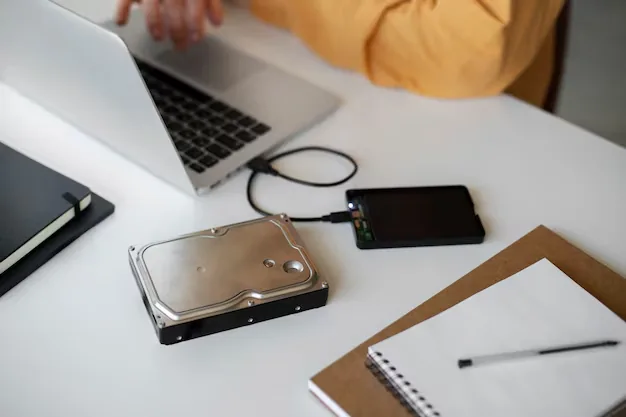
A mechanical hard drive has a physical arm that moves across a spinning platter to find data. Every file it opens waits on that movement. An SSD has no moving parts and reads data electronically, which is why the difference is measured in multiples rather than percentages.
On a five or six year old laptop that still feels usable otherwise, an SSD often makes more sense than replacing the machine. Boot goes from minutes to seconds, applications open immediately, and the laptop stops feeling like it is thinking about it.
There is a reliability angle too. A drive with moving parts in a machine that gets carried around every day is the part most likely to fail, and it is the part holding all your data.
Symptoms we see
- Takes minutes to reach a usable desktop after switching on
- The drive light stays solid while nothing appears to happen
- Applications take a long time to open
- Clicking, grinding or whirring from inside the case
- File copies crawl, or the system freezes while saving
- Windows reports drive errors, or a SMART warning appears
We check the health of your current drive first. If it is already failing, cloning has to be handled carefully and sometimes a data recovery step comes before the upgrade.
We confirm what your laptop supports, whether that is a 2.5 inch SATA drive, an M.2 SATA or an NVMe module, because they are not interchangeable and the wrong one simply will not work.
Then we clone your existing installation, applications and files onto the new drive so you switch on to the setup you already know rather than a blank machine. We test the boot, verify your data is intact, and keep the old drive available so nothing is lost in the move.
How a repair works here
The same five steps every time, so you always know where your laptop is and what it is going to cost.
-
01
Diagnose
We find out what has actually failed rather than replacing the part the symptom points at.
-
02
Explain
You get told what is wrong, what it will cost and whether the repair is worth doing, before any work starts.
-
03
Repair
The work is done on the bench with the right parts for your model, not a near enough substitute.
-
04
Test
We run the laptop properly afterwards to confirm the fault is gone and nothing else has been disturbed.
-
05
Deliver
You collect it, or we drop it back to you in the areas we cover.
Brands we handle this on
Each brand fails in its own way. Pick yours to see what we see most often and what it takes to fix.
Dell
Inspiron, Vostro, Latitude, XPS, G Series and Alienware
HP
Pavilion, Envy, ProBook, EliteBook, Omen, Spectre and the HP 14 and 15 series
Lenovo
ThinkPad, IdeaPad, Yoga, Legion, ThinkBook and V Series
ASUS
VivoBook, ZenBook, TUF Gaming, ROG, ExpertBook and Chromebook
Acer
Aspire, Swift, Nitro, Predator, TravelMate and Extensa
MSI
GF, GL, GP, GS, Katana, Bravo, Modern, Prestige and Stealth
MacBook
MacBook Air, MacBook Pro, MacBook Pro Retina and iMac
Often needed alongside this
Where we cover in Ahmedabad
Our workshop is in Satellite. These are the areas we currently collect from and drop back to.
Satellite
Our workshop is in Satellite, near Seema Hall, so this is the area we cover most directly. You can bring a laptop in and talk to the person who will be working on it.
Prahladnagar
Prahladnagar is a short distance from our Satellite workshop, and it is one of the areas covered by our free pick-up and drop-off service.
Gota
Gota is covered by our free pick-up and drop-off service, so a laptop can be collected from you rather than you making the trip to Satellite.
Paldi
Paldi is covered by our free pick-up and drop-off service, and it is an easy run from our workshop in Satellite.
Maninagar
Maninagar is on the east side of the river and is covered by our free pick-up and drop-off service.
Bapunagar
Bapunagar is covered by our free pick-up and drop-off service in east Ahmedabad.
Common questions
Will I lose my files and have to reinstall everything?
No. We clone the existing drive so your Windows installation, your programs and your files come across as they are. You switch on to the setup you already know.
What size SSD should I get?
Match or exceed what you are currently using. Most people are comfortable at 512GB. If you keep large photo or video libraries, 1TB is worth the difference.
My laptop already has an SSD but is still slow. Will a new one help?
Probably not. If storage is already solid state, the bottleneck is usually memory or a software problem, and we would check those instead.
Can you keep my old hard drive?
Yes. We can return it to you as it is, or fit it into an external enclosure so it becomes extra storage.
Laptop problem? Get it checked.
Tell us what your laptop is doing and we will tell you what it needs. Diagnosis first, then a clear price, then the repair.